If

计算表达式并根据计算结果(true 或 false)采用分支。 您还可以在脚本的IF 作中使用Snippet action语句。


支持的脚本类型

The icon for a Generic script type - a rectangle with < and > symbols inside it.

The icon for the Email script type - a large @ symbol in a diamond.

The icon for the Chat script type - a chat bubble with an ellipsis inside (...), in a diamond shape.

The icon for the Phone script type - an old-style phone handset with curved lines indicating sound coming out of it.

The icon for the Voicemail script type - a symbol that looks like a cassette tape - two circles sitting on a horizontal line.

The icon for the Work Item script type-a piece of paper with one corner folded down and a bullet list on it.

The icon for the SMS script type - a smart phone with a chat bubble coming out of it.

The icon for the Digital script type - a computer monitor with a smartphone next to it.

通用

电子邮件 聊天 电话 语音邮件 工作项 SMS 数字

输入属性

这些属性定义操作在执行时使用的数据。

属性

说明

Caption 将 Caption 更改为在脚本中唯一标识此操作的内容。 IVR 发布路径报告包括操作的名称和标题。 独特的描述性标题使报告更易于阅读和理解。Use only for BEGIN CASE IF IVRLOG MENU and REQAGENT
Expression 对一个值进行求值,以确定表达式是“对”还是“错”。 例如,TOTAL=>0(总数等于或大于 0)。

结果分支条件

结果分支条件允许您在脚本中创建分支,以在执行操作时处理不同的结果。

条件

说明

True

表达式为真时所采用的路径。

False

表达式为假时所采用的路径。

脚本示例

这是一个示例,说明如何在脚本中使用此操作。 它并不是一个完整的脚本。 可能还需要编写其他脚本。

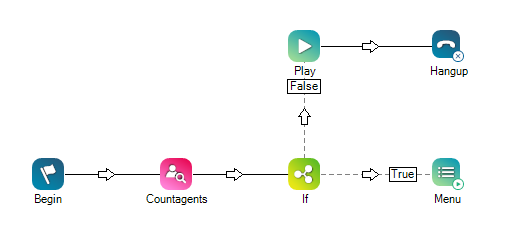
触发此脚本时,将计算可用坐席的数量。 If 操作使用 TOTAL>0 表达式来确定采用哪个分支。 如果可用的坐席总数大于 0,则菜单将为呼叫者提供选项。 如果坐席总数未大于 0,则会播放一则消息,且脚本将挂断呼叫。
您想下载这个脚本吗?